Best Structured Data Normalization Software for SLRs
Best Structured Data Normalization Software for SLRs
For systematic literature review teams, Papersynapse is the strongest pick for label and field normalization: it combines researcher-defined coding schemes, page-level evidence linking, and PRISMA-auditable exports in one platform.
- Researcher-defined coding schemes + PRISMA audit trail. You build the extraction schema before a single paper is touched, which is exactly what pre-analysis harmonization best practices require. Every extracted value carries a page citation, so your audit trail is built automatically.
- Confidence scores and evidence-type indicators. Each field gets a quality flag, letting reviewers prioritize human attention on low-confidence values rather than re-reading every source paper.
- Scalable batch processing with compatible exports. Papersynapse processes papers rapidly to support large systematic reviews and exports to CSV and RevMan, covering the two formats most meta-analysis teams need.
Research teams that need a reproducible, auditable extraction pipeline without stitching together separate tools will find Papersynapse fits the workflow from day one.
Table of Contents
- Why does label normalization matter so much in systematic reviews?
- What features must structured data normalization software include?
- How do you evaluate normalization tools during a demo or trial?
- How do you build a PRISMA-auditable normalization pipeline?
- How does Papersynapse meet the SLR normalization checklist?
- What does Papersynapse cost, and how fast does it process papers?
- How does Papersynapse compare to other normalization tools for SLRs?
- What support and training does Papersynapse offer?
- How well does Papersynapse scale for large or complex reviews?
- Key Takeaways
- The gap between “automated extraction” and actual normalization
- Papersynapse is built for exactly this workflow
- Useful sources
Why does label normalization matter so much in systematic reviews?
The short answer: without it, your dataset cannot be audited, replicated, or pooled. A scan of 33 published meta-analyses found none explicitly reported pre-analysis harmonization steps, meaning most published reviews carry an invisible reproducibility risk. When one study reports “mean HbA1c change” and another reports “glycated hemoglobin reduction (%)” for the same construct, a flat extraction table treats them as different variables. That is a coding error, not a data quirk.
Semantic harmonization in SLRs is fundamentally different from ETL normalization in data engineering. ETL maps column names across databases. SLR normalization maps meaning across studies: different measurement scales, units, arm labels, and time points that all refer to the same underlying construct. Researcher-defined codebooks are the mechanism that makes that mapping defensible.
The Cochrane Handbook is direct on this: automation can assist extraction, but most tools target only a narrow set of PICO fields, and human checks remain mandatory for numeric precision. The implication for tool selection is clear. A platform that automates first-pass extraction but provides no mechanism for human verification of individual values is not a normalization solution; it is a drafting aid.
- Pre-specifying units and metrics in a coding manual before extraction reduces downstream rework.
- Semantic harmonization requires researcher-defined ontologies, not generic field mapping.
- Building a PRISMA-auditable workflow from day one cuts errors at synthesis, not just at reporting.
- Automation benefits are real, but only when paired with human verification loops.
What features must structured data normalization software include?
The non-negotiables for any SLR-focused normalization platform are: a researcher-defined schema editor, page-level evidence linking, and a human-in-the-loop verification workflow. Everything else is secondary.
- Synchronized PDF viewer. Side-by-side viewing of the source PDF and the extraction table is critical for validating complex outcomes scattered across tables, figures, and supplements.
- OCR and table parsing. A 2024 baseline review found table extraction is under-explored across most tools; verify this capability explicitly during a trial.
- Export formats — CSV for statistical software; RevMan for Cochrane-style meta-analysis.
Pro Tip: Semantic mapping support (the ability to define synonym lists or ontology mappings for label variants) separates tools built for SLRs from general-purpose extraction utilities. Ask vendors specifically whether the schema editor supports controlled vocabularies.
How do you evaluate normalization tools during a demo or trial?
Run these checks live, not from a feature list:
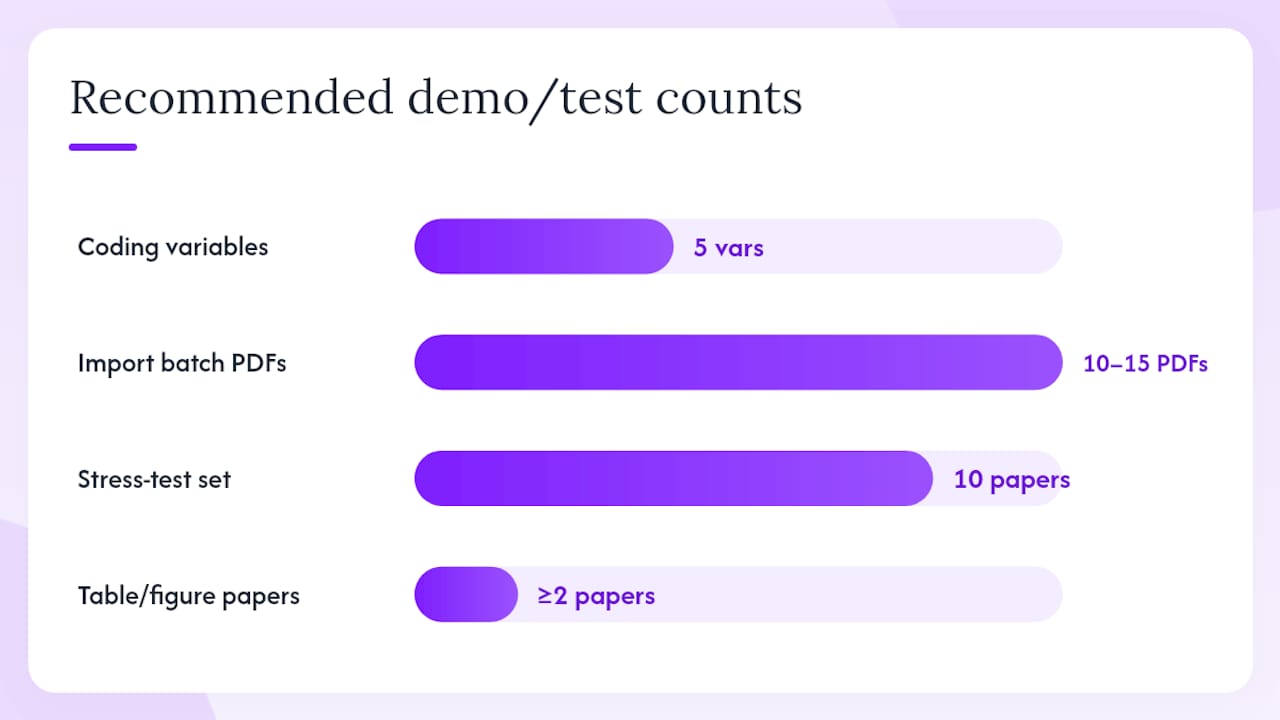
- Create a custom coding schema with at least five variables, including one with a controlled vocabulary and one numeric field with a unit column.
- Import a batch of 10–15 PDFs that include at least two papers with results reported only in tables or figures.
- Pull up a single extracted value and verify the page citation links back to the correct location in the PDF.
- Inspect confidence scores: are low-confidence values flagged visibly, or do you have to hunt for them?
- Test OCR on a paper with a multi-arm results table. Check whether the tool extracts each arm as a separate row.
- Export to CSV and open it in your statistical software of choice. Confirm unit columns are preserved.
- Export to RevMan format and check that study IDs and arm labels map correctly.
- Ask about collaboration: can two reviewers work on the same project simultaneously, and does the platform log changes?
Pro Tip: Build a 10-paper stress-test set before any demo: include one multi-arm RCT, one paper reporting outcomes only in a figure, one paper using non-SI units, and one supplement-heavy paper. This set will expose gaps in table parsing and unit handling faster than any vendor walkthrough.
For security questions, ask specifically: where is uploaded data stored, is it used to train models, and is there an institution-level subscription or data processing agreement available for university procurement.
The AI-assisted extraction research confirms that LLMs are effective for first-pass drafts but require human validation; a platform that cannot show you where it found a value is not ready for a PRISMA-compliant review.
How do you build a PRISMA-auditable normalization pipeline?
An auditable pipeline takes six steps, and the first one happens before you open any software.
- Define variables and write the coding manual. List every variable, its allowed values, units, and the decision rules for ambiguous cases. The DECiMAL guide recommends pre-specifying preferred metrics in the protocol and grouping related variables to reduce errors.
- Human verification using confidence scores and synchronized PDF view. Prioritize low-confidence flags. Two reviewers should independently verify a random sample; use the systematic review quality checklist to structure disagreement resolution.
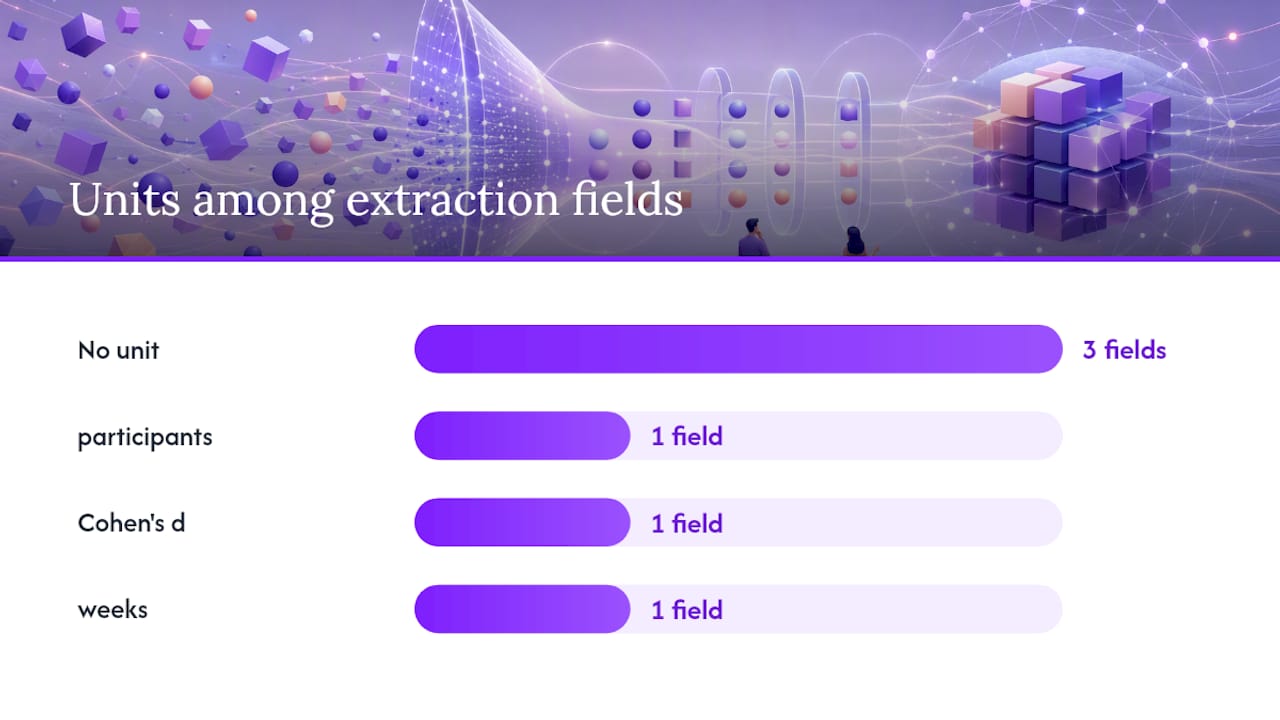
| Field | Example value | Unit column | Notes |
|---|---|---|---|
| Study ID | Smith | — | Unique identifier |
| Arm label | Intervention A | — | Matches paper text exactly |
| Sample size | — | participants | Per arm |
| Effect size | — | Cohen’s d | Pre-specified metric |
| Time point | — | weeks | Numeric + unit separated |
| Page citation | p. 4, Table 2 | — | Source location |
Pro Tip: Preserve original units in a dedicated unit column and postpone all conversions until the final analysis stage. Converting during extraction destroys provenance and makes it impossible to audit whether a conversion was applied correctly.
How does Papersynapse meet the SLR normalization checklist?
Papersynapse maps directly to every item on the checklist above.
| Checklist item | Papersynapse capability |
|---|---|
| Researcher-defined schema editor | Custom extraction fields configured before any paper is processed |
| Synchronized PDF viewer with page citations | Inline evidence linking; each value shows its source page |
| Confidence scores and quality flags | Per-field confidence indicators for human review prioritization |
| Export to CSV and RevMan | Native export in both formats; data stays with the researcher |
| Batch processing throughput | Up to 200 papers processed in under two minutes |
| Collaboration and versioning | Multi-user projects with role-based access |
| Data ownership and security | Researcher retains data; payment and access managed through Stripe |
A typical PhD-team workflow: import references from Scopus or Web of Science as CSV or RIS, configure the coding schema, run a 15-paper pilot, verify flagged values against the synchronized PDF view, then batch-process the full corpus and export. The reproducible methodology guide on the Papersynapse blog walks through each stage in detail and covers PRISMA-compliant export configuration.
What does Papersynapse cost, and how fast does it process papers?
Papersynapse runs on a tiered subscription model. A free tier is available for small projects, covering a limited number of papers per month. Pro and Ultra tiers unlock higher paper volumes for teams running larger reviews. Exact pricing is listed on the Papersynapse landing page; tiers are billed monthly through Stripe, and no long-term contract is required.
On throughput: the platform processes papers quickly to enable efficient first-pass extractions for typical review sizes. Human verification time depends on the complexity of the coding schema and the proportion of low-confidence flags, not on the platform’s processing speed.
How does Papersynapse compare to other normalization tools for SLRs?
Most tools available to SLR teams fall into one of three categories: general-purpose reference managers with limited extraction fields, semi-automated screening tools that stop at title/abstract, and full extraction platforms with schema support.
| Feature category | Entry-level / screening tools | Full extraction platforms | Papersynapse |
|---|---|---|---|
| Researcher-defined schema | Rarely | Sometimes | Yes |
| Page-level citations | No | Varies | Yes |
| Confidence scores | No | Varies | Yes |
| OCR / table parsing | No | Varies | Yes |
| CSV + RevMan export | Limited | Often | Yes |
| Batch throughput | Slow | Varies | Up to 200 papers/2 min |
| Free tier | Sometimes | Rarely | Yes |
The living review of extraction methods confirms no single architecture has become the standard; what separates tools in practice is whether they support the full normalization workflow or only a subset of it.
What support and training does Papersynapse offer?
Papersynapse provides documentation, a blog covering SLR methodology, and guides on PRISMA-compliant export configuration. The blog covers topics from multi-researcher coordination to coding manual design, giving teams reference material beyond the platform’s own help docs.
For teams new to structured extraction, the literature review workflow checklist is a practical starting point. Community support is available through the platform’s standard channels; institution-level support arrangements are worth asking about during procurement.
How well does Papersynapse scale for large or complex reviews?
The batch processing claim of 200 papers in under two minutes addresses volume scaling directly. For complexity, the researcher-defined schema editor handles multi-arm studies, multiple outcomes per paper, and non-standard units, provided the coding manual accounts for them. Relational structures reduce redundancy in complex multi-arm extractions compared with flat-file approaches, and Papersynapse’s export to CSV supports downstream relational analysis.
For very large reviews (1,000+ papers), the practical ceiling is human verification time, not platform throughput. Confidence scores and quality flags help teams allocate reviewer effort efficiently rather than verifying every value manually.
Key Takeaways
For SLR teams, the coding manual comes first: every normalization decision made before extraction saves hours of rework at synthesis.
| Point | Details |
|---|---|
| Start with the coding manual | Define all variables, units, and decision rules before configuring any extraction tool. |
| Require page-level citations | Every extracted value must link to its source page; this is the foundation of a PRISMA audit trail. |
| Use confidence scores strategically | Prioritize human verification on low-confidence flags, not blanket re-reading of every paper. |
| Preserve original units | Store units in a separate column during extraction; convert only at the final analysis stage. |
| Papersynapse covers the full pipeline | Researcher-defined schemas, page citations, confidence flags, CSV/RevMan export, and batch throughput in one platform. |
The gap between “automated extraction” and actual normalization
Most research teams shopping for extraction tools are actually solving two different problems at once: getting data out of PDFs, and making that data comparable across studies. Vendors often conflate the two. A tool that fills a table from an abstract has done the first job; it has done almost none of the second.
The normalization problem is harder because it is inherently researcher-specific. No general-purpose AI knows whether “change from baseline” and “post-intervention score” should be treated as the same variable in your review. Only your coding manual does. That is why the advice to write the coding manual first is not a workflow preference; it is the only way to make the AI’s output meaningful. LLMs will keep improving at first-pass extraction, and that is genuinely useful. But the page-level citation, the confidence score, and the human reviewer looking at the synchronized PDF are not going away. They are what makes the output citable.
Teams that treat normalization software as a shortcut to skip the coding manual will get fast, inconsistent data. Teams that treat it as infrastructure for a pre-specified protocol will get a reproducible dataset. The tool matters less than the discipline around it.
Papersynapse is built for exactly this workflow
Researchers running systematic literature reviews need more than a PDF reader with export. They need a platform where the coding schema is the starting point, not an afterthought.

Papersynapse offers a free tier for small pilots, with Pro and Ultra tiers for teams processing larger corpora. The workflow is straightforward: sign up, import your references from Scopus or Web of Science, configure your coding schema, run a 15-paper pilot using the checklist in this article, then scale to the full corpus. PRISMA-compliant export documentation is available on the Papersynapse blog. Start your pilot at papersynapse.com and see how far a pre-specified schema takes you.
Useful sources
These sources cover the methodology, automation limits, and practical guidance researchers need to justify their extraction approach and configure a defensible coding manual.
- Best practices for data harmonization in meta-analysis (PubMed summary)
- Data extraction and comparison for complex systematic reviews: step-by-step guideline (Springer)
- AI-assisted data extraction and verification in systematic reviews (Frontiers in Digital Health)
- Data extraction methods for systematic review (living review update) — PMC
- Cochrane Handbook chapter on data collection and extraction
- Baseline review of automated data extraction techniques for social sciences (F1000Research)
- Data extraction for complex meta-analysis (DECiMAL) guide
- PaperSynapse: AI Tool for Systematic Literature Reviews (landing page)