Reproducible Custom Data Extraction Fields for Systematic Reviewers
Reproducible Custom Data Extraction Fields for Systematic Reviewers
Design your extraction fields around your PICO question, pilot them on 3 to 5 studies before full deployment, define every field in a written codebook, double extract anything that feeds a meta-analysis, and export with provenance columns intact. Skip any of those five steps and you inherit rework later, usually mid-review when it’s most expensive to fix. The templates and examples below show exactly how to build it right the first time.
TL;DR:
- Custom extraction fields are necessary when review questions involve rare outcomes, subgroup analyses, or multiple intervention variants that standard templates cannot capture reliably.
- Preparing clear, concise definitions and testing them on a sample study before full extraction prevents misinterpretation and saves significant rework later.
- Pilot testing with 3 to 5 studies ensures the template’s robustness, allowing revisions to address ambiguities and improve consistency across extractors.
- Using automated or semi-automated tools for large reviews speeds up the process but requires careful setup of typed fields, provenance tracking, and validation to maintain data quality.
- Limiting template size to 20-60 fields and tracking version changes helps prevent data gaps and inconsistent interpretations across the review team.
Table of Contents
- When Do You Need Custom Data Extraction Fields?
- What Fields Belong in a Systematic Review Extraction Template?
- How Do You Write Field Definitions Extractors Won’t Misread?
- Why Pilot Testing Your Extraction Form Actually Matters
- Choosing Your Extraction Workflow: Spreadsheets, Platforms, or APIs
- Keeping Extracted Data Clean, Typed, and Auditable
- Getting Extraction Data Ready to Export and Analyze
- How Papersynapse Puts This Workflow Into Practice
- Author Perspective: What Actually Trips Up Extraction Templates
- Build Your Template Faster With Papersynapse
- Where to Go Deeper on Extraction Standards
- Sources
- FAQ
When Do You Need Custom Data Extraction Fields?
Standard templates work fine for simple reviews. Custom fields earn their keep when your review question demands something a generic form can’t capture: a rare outcome measure, a specific subgroup breakdown, or an intervention with several delivery variants that a stock “intervention” field would flatten into mush.
Start by mapping your extraction scope directly to the PICO elements driving your analysis, as explained in What Is Colonial Education? The Caribbean Classroom Explained. Every field should trace back to a specific question you plan to ask of your data. If you can’t name the analysis a field feeds, don’t build it.
Custom fields tend to pay off in a few recurring situations:
- Reviews spanning many included studies, where consistency across extractors matters more than flexibility
- Outcomes reported in multiple formats (rate ratios, mean differences, proportions) that need separate typed fields to avoid conflation
- Planned subgroup or sensitivity analyses that require dedicated identifier fields, not buried notes
- Workflows where automation will do first-pass extraction, since typed fields improve model accuracy
The trade-off is real: every added field increases the chance of missing data, inconsistent interpretation, and reviewer fatigue. A 30-field template completed carefully beats a 90-field template completed carelessly.
What Fields Belong in a Systematic Review Extraction Template?
Every extraction template needs a core set of fields regardless of topic, then a layer of topic-specific fields on top. Build the core first.
- Study identification: study ID, first author, publication year, country, funding source
- Design and methods: study design, sample size, recruitment method, follow-up duration
- Population: age range, diagnostic criteria, key inclusion/exclusion characteristics
- Intervention and comparator: dose, frequency, delivery mode, comparator description
- Outcomes and results: outcome definition, timepoint, effect estimate, precision (SD, CI, or range)
- Risk of bias: domain-level judgments tied to whichever tool your review protocol specifies
Supplementary fields cover setting (inpatient vs. outpatient), conflicts of interest, and subgroup identifiers for stratified analysis. The NCBI Bookshelf’s example extraction form maps this same structure and works well as a starting scaffold you customize rather than build from scratch.
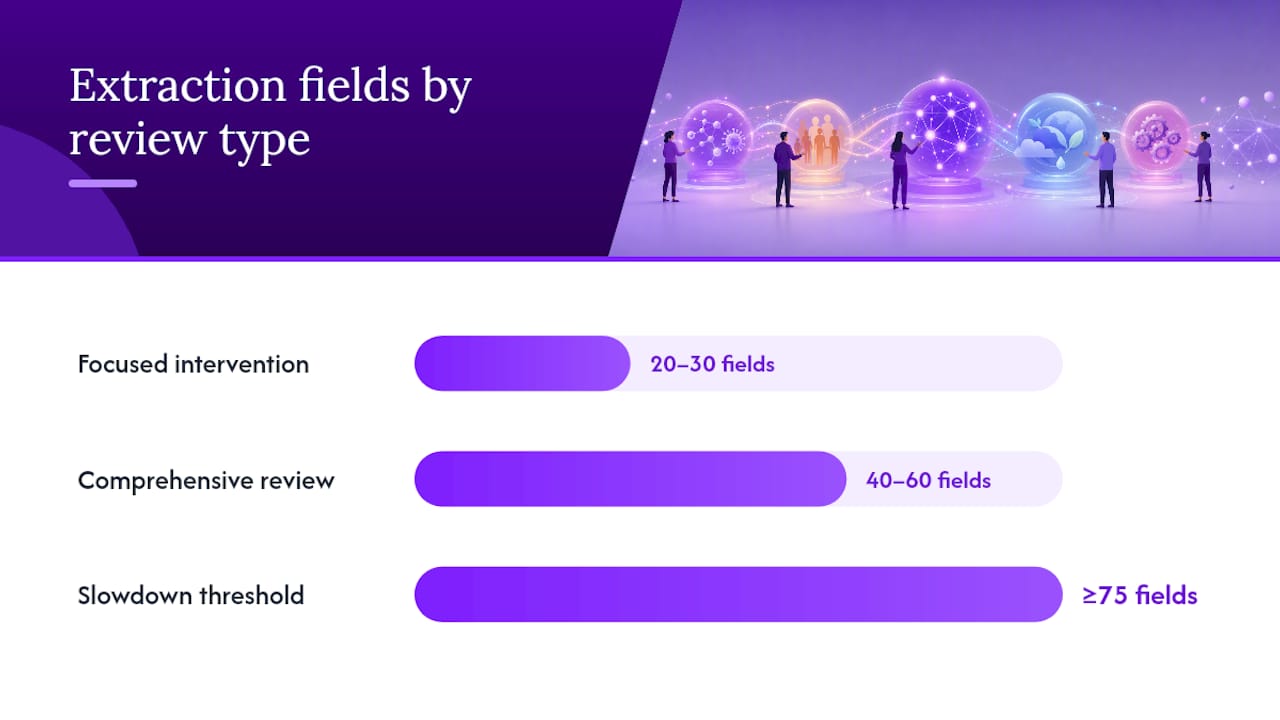
On volume: focused intervention reviews with a narrow outcome set usually land around 20 to 30 fields. Comprehensive reviews running multiple subgroup analyses often need 40 to 60. Past 75 fields, extraction slows dramatically unless you’re running automated first-pass extraction with human verification behind it.
How Do You Write Field Definitions Extractors Won’t Misread?
A field name means nothing without a definition. “Sample size” sounds obvious until one extractor logs the enrolled total and another logs the analysed total, and now your dataset has two incompatible numbers under one header.
Every field needs a short metadata entry covering:
- Name: the exact column header, never renamed mid-review
- Description: one sentence defining what counts and what doesn’t
- Example: a real value pulled from a sample study
- Type: text, number, date, or a closed dropdown
- Allowed values: for enums, the exact permitted list
- Missing-data rule: what to enter when the paper doesn’t report it
- Source location guidance: where in the paper to look first (abstract, results table, supplementary appendix)
Favor closed-ended fields over free text wherever the answer set is finite. Cochrane’s guidance specifically recommends closed-ended questions because they reduce interpretation drift between extractors. Add an “other, specify” option for edge cases, and consider an evidence-span field where extractors paste the exact sentence supporting their entry. That single habit turns disputed entries into two-minute checks instead of half-hour re-reads.
Pro Tip: Write your codebook entries before you touch a single paper, then test them against one study you already know well. If you catch yourself hesitating over how to log a value, your definition isn’t finished yet.
Why Pilot Testing Your Extraction Form Actually Matters
Skipping the pilot is the single most common reason extraction templates fall apart halfway through a review. Fields that seemed obvious during design turn out ambiguous the moment a real paper reports something unexpected.
- Pilot on 3 to 5 representative studies covering the range of designs and reporting styles you expect across the full set. Cochrane’s handbook recommends completing a draft characteristics table and at least one risk-of-bias assessment during this pilot phase to confirm the form captures what synthesis actually needs.
- Revise the codebook based on what broke. If two extractors interpret a field differently, the field’s definition failed, not the extractor. Fix the wording, not the person.
- Double extract critical fields (primary outcomes, effect estimates, sample sizes) throughout the full review, not just the pilot. Document your adjudication rule in advance: does a third reviewer decide, or does the team discuss to consensus?
- Log extractor identity, extraction date, and form version on every single row. When you revise the template mid-review, and you will, this log tells you exactly which rows need re-extraction under the new version.
A piloted extraction table built this way catches most structural problems before they multiply across 50 or 100 papers.
Choosing Your Extraction Workflow: Spreadsheets, Platforms, or APIs
Three tiers of tooling handle custom fields differently, and the right choice depends on review size and team structure rather than personal preference.
- Low-tech: a structured spreadsheet with data validation dropdowns for enum fields, exported to CSV. Works well for single-reviewer projects under 30 studies, but breaks down fast once multiple people need simultaneous access.
- Mid-tech: dedicated review-management platforms that support saved templates, team assignment, and built-in double extraction tracking. This is where most academic teams doing systematic reviews for publication land.
- High-tech: schema-based extraction APIs and custom-trained models that read source text and populate fields automatically. Declaring field types and descriptions at setup meaningfully improves accuracy, according to Google’s Document AI documentation on custom model training.
Whichever tier you choose, treat missing values as a normal, expected output rather than a failure state. Schema-based extraction tools are designed to report a field as missing rather than guess at a plausible value, and your workflow should preserve that honesty instead of forcing an inferred answer into an empty cell. Set a confidence threshold below which every extracted value routes to manual review.
Keeping Extracted Data Clean, Typed, and Auditable
Raw extraction is only half the job. Normalization turns a pile of inconsistent entries into a dataset you can actually run numbers on.
Convert dates to ISO format (YYYY-MM-DD) across every row, and hold numeric fields to a single unit and decimal convention so a mean reported in one paper as “12.4” and another as “12.40 ± 3.1” land in comparable columns. Categorical fields should map to a fixed enum list decided during template design, not whatever term each extractor happened to type.
Provenance matters as much as the data itself. Store an evidence span or source location for every extracted value, along with a “found” flag or confidence score. Databricks’ ai_extract function supports exactly this pattern: typed schemas with optional citations and confidence scores attached to each field, which turns a disputed value into a two-click verification instead of a re-read of the full paper.

Run basic validation before you call extraction complete: check numeric fields fall within plausible ranges, generate a missingness report by field, and flag anything below your confidence threshold for a second look. Low-confidence items deserve human eyes before they touch an analysis.
Getting Extraction Data Ready to Export and Analyze
The extraction table you hand off to analysis should need zero cleanup. That means one study per row, consistent column headers that match your codebook exactly, and typed columns where numeric fields actually contain numbers, not “approximately 12.”
- Add provenance columns for extractor name, extraction date, form version, and source location on every row
- Run a pre-export check for missingness, out-of-range values, and unit consistency across the full table
- For meta-analysis prep, run a paired check confirming every effect-size input (sample size, mean, SD, or event count) is present and typed correctly before export
- Export as CSV with headers matching your codebook so downstream tools import without remapping
Most meta-analysis workflows fail at this exact handoff point, not during extraction itself, because a table that looked fine in the spreadsheet turns out to have three different date formats hiding in one column.
How Papersynapse Puts This Workflow Into Practice
Some platforms build this sequence into a single integrated tool rather than leaving researchers to stitch spreadsheets, templates, and validation checks together by hand.
- Some platforms allow importing references from sources such as Scopus or Web of Science
- Users can build custom extraction templates mapped to PICO questions with typed fields and controlled vocabularies
- It is possible to pilot templates on a subset of studies and then run AI-assisted extraction across the full set
- Low-confidence extractions may be flagged automatically for manual review
- Reviewer edits can merge into a normalized table shared by the team
- Export to enriched CSV with provenance maintained supports meta-analysis or further processing
| Step | Manual approach | Papersynapse approach |
|---|---|---|
| Template design | Built field by field in a spreadsheet | Customizable template mapped to PICO |
| Extraction | Reviewer reads each abstract | AI-assisted first pass, human review of flags |
| QA | Manual double-check | Confidence flags route uncertain items |
| Export | Manual CSV cleanup | Direct enriched CSV export |
Some platforms report processing up to 200 papers in under two minutes for first-pass extraction, though pilot testing on a small batch remains important before trusting automated output at scale.
Author Perspective: What Actually Trips Up Extraction Templates
Most extraction templates don’t fail because reviewers picked the wrong fields. They fail because nobody piloted the form, free-text fields multiplied past what anyone could standardize, and version changes went untracked mid-review. Run the short version: map to your analysis, pilot on a handful of studies, favor closed-ended fields over open text, double extract anything critical, and export with provenance attached.
If you’re scaling one template across multiple reviewers or multiple reviews, write the codebook once and treat it as a living document. Every revision needs a version number and a date, because the alternative is trying to remember three weeks later why row 47 doesn’t match the current field definitions.
— Ubada
Build Your Template Faster With Papersynapse
Building a piloted, codebook backed extraction template by hand takes real time, usually more than researchers budget for before a deadline closes in. Papersynapse compresses that setup: define your custom fields once, import your reference list, and let AI-assisted extraction handle first-pass reading across hundreds of abstracts while flagging anything uncertain for your review.

The platform handles the mechanical parts of this guide, template structure, typed fields, normalization, and export, while you still make the judgment calls that matter: which fields belong in your codebook, and which flagged items need a second look. Pilot on a small batch first, the same way you would with any manual template, before scaling to your full reference list. Visit the Papersynapse platform to build a template around your PICO question and run a trial extraction on your own studies.
Where to Go Deeper on Extraction Standards
For the authoritative source on piloting, closed-ended field design, and provenance logging, read Cochrane Handbook Chapter 5 directly. The NCBI example extraction form offers a field-by-field template worth adapting rather than copying outright.
- Cochrane Handbook Chapter 5: piloting, closed-ended fields, provenance
- NCBI Bookshelf: example extraction form structure
- Document AI custom extraction docs: schema and training-set requirements for automated fields
Sources
- Chapter 5: Collecting data | Cochrane
- Example data extraction form for systematic reviews | NCBI Bookshelf
- Sapling
- ai_extract function | Databricks on AWS
- Custom-based extraction | Document AI
FAQ
Can AI Do Data Extraction for Systematic Reviews?
Yes. AI tools can read abstracts and populate structured fields automatically, but accuracy depends on how clearly fields are typed and described, and low-confidence extractions still need human review before they enter an analysis.
Which Extraction Method Works Best for Large Reviews?
For reviews beyond 40 or 50 studies, a hybrid approach works best: AI-assisted first-pass extraction against a piloted template, with double extraction on critical fields and manual review of anything flagged low-confidence. Platforms designed for AI-assisted first-pass extraction with manual review support this pattern.
What Is the Best Tool for Data Extraction in Reviews?
The right tool depends on review size. Spreadsheets suit small single-reviewer projects, review-management platforms fit team based reviews, and AI-assisted platforms suit teams processing high volumes of papers who still need typed, auditable output.
What Are the Main Methods for Extracting Review Data?
The three main approaches are manual extraction into a structured spreadsheet or form, extraction within a dedicated review-management platform, and AI-assisted extraction using schema-based tools that return typed values with evidence spans.
How Many Fields Should a Custom Extraction Template Have?
Focused intervention reviews typically need 20 to 30 fields, while comprehensive reviews with subgroup analyses often run 40 to 60. Templates beyond 75 fields usually require automated first-pass extraction to stay manageable.