How to Reduce Manual Literature Sorting Time in SLRs
How to Reduce Manual Literature Sorting Time in SLRs

The fastest way to reduce manual literature sorting time is a human-assisted automation workflow: import references from Scopus or Web of Science via RIS/CSV, run deduplication, apply AI-assisted screening, and verify extracted fields against source anchors before exporting a PRISMA-compliant report. You can start in under 30 minutes by uploading an existing reference set into a platform like Papersynapse and running its automated extraction against a predefined schema.
- Import first: export your current reference set from PubMed, Scopus, or Web of Science as RIS or CSV and load it into your automation tool.
- Define your schema upfront: list every field you need (study design, population, intervention, outcome) before the first automated run. Changing the schema mid-review forces re-extraction.
- Set a verification gate on numeric fields: AI extraction handles text variables reliably; numeric and table data need human review every time.
Pro Tip: Run a 20-paper pilot before committing your full corpus. Compare the automated output against your own manual extraction on those 20 papers to calibrate confidence thresholds before scaling.
Key Takeaways
Automated screening at roughly 3 seconds per abstract versus 66 seconds for human reviewers is the benchmark to measure your workflow against, and it is only achievable when extraction is paired with source anchors and a verified audit trail.
| Point | Details |
|---|---|
| Define schema before importing | Set PICO fields and extraction schema upfront to prevent costly mid-review schema changes. |
| Automate screening, verify numerics | AI handles text variables reliably; numeric and table fields require human verification every run. |
| Pilot before scaling | Test on 50–100 heterogeneous papers and measure correction rates before expanding to your full corpus. |
| Maintain your pipeline actively | Log model and schema versions; run lightweight checks after each job to catch silent regressions early. |
| Papersynapse for end-to-end SLRs | Papersynapse covers import, deduplication, AI extraction, team verification, and PRISMA export in one platform. |
Table of Contents
- How does human-assisted automation actually cut sorting time?
- A step-by-step workflow to speed up document sorting
- What should you look for when evaluating literature sorting tools?
- How to run a pilot and roll out automation across your team
- What do peer-reviewed evaluations say about time saved?
- What are the real risks, and how do you mitigate them?
- The case for cautious, iterative adoption
- Papersynapse puts this workflow into practice
- Sources
How does human-assisted automation actually cut sorting time?
Human-in-the-loop (HITL) automation sits between two extremes: a researcher manually reading every abstract in Excel, and a fully autonomous pipeline that produces outputs no one can audit. Neither extreme works well for systematic literature reviews. The HITL model assigns repetitive, high-volume tasks to software and reserves human judgment for decisions that require it.
Protocol-driven automation shifts manual tasks to machine execution and lets reviewers focus on protocol design and interpretation, which is where expertise actually matters. The modular components of a working HITL pipeline are:
- Collectors: API calls to PubMed, Scopus, Web of Science, and preprint servers that gather references automatically.
- Normalizers: tools that standardize author names, journal titles, and date formats so downstream deduplication works cleanly.
- Deduplicators: DOI-first matching with a fuzzy-title fallback to catch duplicates that lack DOIs.
- Scorers: lightweight heuristics that rank abstracts by relevance before any human reads them.
- LLM-assisted extractors: models that populate a structured JSON schema from abstract or full-text content, with confidence scores and source anchors for every field.
- Verification UI: a review interface where a human confirms or corrects flagged outputs.
- Export layer: PRISMA-compliant reports and enriched CSV or RIS files for downstream analysis.
A KNIME workflow combining document parsing and LLMs achieved around 81% accuracy in text-mode extraction for scientific publications, with higher accuracy in image mode for some document types. That figure illustrates both the value of multimodal parsing and the ceiling you should plan around.
Pro Tip: Place verification gates specifically at numeric outcomes and table extractions. Text fields like study design and population description are where automation earns its keep; numeric fields are where it quietly fails.
A step-by-step workflow to speed up document sorting
- Define your protocol and extraction schema. Write your PICO elements (Population, Intervention, Comparator, Outcome) or equivalent fields before touching any tool. A clear schema front-loads reproducibility and prevents schema drift mid-review.
- Run parallel API collection. Query PubMed, Scopus, Web of Science, and any relevant preprint servers simultaneously. Use batching and continue-on-fail patterns so a single API timeout does not abort the full collection run.
- Normalize and deduplicate. Apply DOI-first matching; fall back to a normalized-title key for records without DOIs. Relational databases with clear data dictionaries reduce redundant entry and improve extraction reliability compared to flat-file approaches.
- Score and prioritize. Apply title and abstract heuristics to rank records. Reviewers see the highest-probability inclusions first, which compresses the time to a decision on the bulk of the corpus.
- Run AI-assisted extraction. Feed abstracts (and full texts where available) into an LLM extraction step against your strict JSON schema. Every extracted value should carry a source anchor (the sentence or table cell it came from) and a confidence score.
- Human verification and PRISMA export. Flag any field below your confidence threshold for manual review. Export the final dataset as an enriched CSV and generate a PRISMA flow diagram for your methods section.
- For numeric and table fields, set a lower confidence threshold so more outputs route to human review automatically.
- Log every schema version and every model version used. Silent model updates are a reproducibility risk.
Pro Tip: Enforce strict JSON schema validation at the extraction step. If the LLM returns a malformed output, the pipeline should reject and retry rather than pass a corrupted record downstream.
What should you look for when evaluating literature sorting tools?
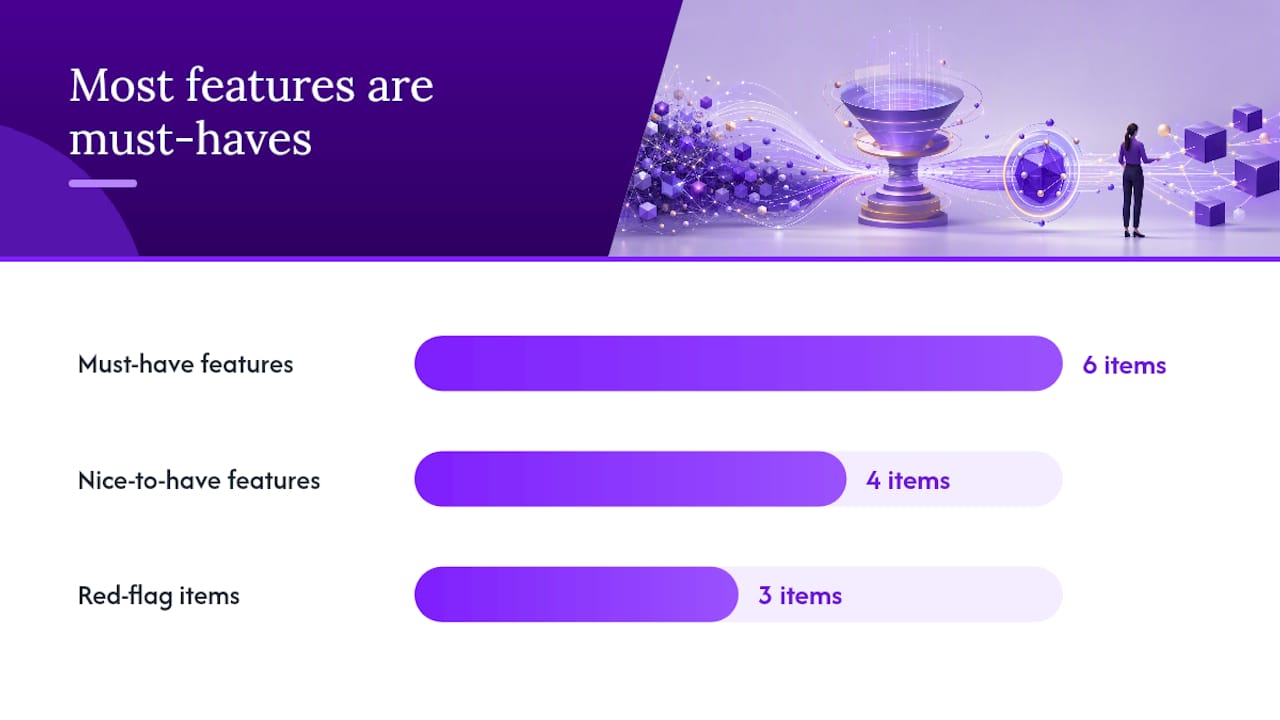
Must-have features:
- Multi-source API collection (PubMed, Scopus, Web of Science) plus RIS/CSV import
- Deduplication with DOI matching and fuzzy-title fallback
- Structured extraction with source anchors for every field
- Full audit trail (who extracted what, when, from which source)
- Export to RIS and CSV; PRISMA-compliant screening reports
- Team collaboration with role-based review assignments
Nice-to-have:
- Domain-tuned extraction models
- Table reconstruction for numeric data
- Configurable confidence thresholds per field
- Built-in scoring heuristics for priority screening
Red flags:
- Extraction outputs with no source anchors (you cannot verify what the model read)
- No audit trail or version logging
- No standard import/export formats (RIS, CSV)
| Feature category | Importance |
|---|---|
| Multi-source collection and RIS/CSV import | Must-have |
| Deduplication with DOI and fuzzy fallback | Must-have |
| Extraction with source anchors and confidence scores | Must-have |
| Audit trail and version logging | Must-have |
| PRISMA-compliant export | Must-have |
| Table reconstruction for numeric fields | Nice-to-have |
| Domain-tuned models | Nice-to-have |
| Opaque extraction without source anchors | Avoid |
A systematic review quality checklist can help your team apply these criteria consistently across tool evaluations.
How to run a pilot and roll out automation across your team
- Select a pilot corpus of 50–100 papers that includes heterogeneous formats and at least one table-heavy paper. Homogeneous pilots overestimate real-world performance.
- Define success metrics upfront: papers processed per hour, time per screening decision, percentage of extracted fields needing manual correction, and screening recall against your gold standard.
- Assign roles: one person owns schema maintenance, one owns verification adjudication, one tracks correction rates. Document every decision in a shared log.
- Run the pilot, measure, and refine. Adjust confidence thresholds based on observed correction rates. If more than 15% of a field’s outputs need correction, that field is not ready for automation.
- Scale gradually. Move from pilot cohort to full corpus only after correction rates stabilize. Automate daily or weekly collection runs once the pipeline is validated.
Key metrics to track throughout:
- Time per abstract screened (automated vs. manual baseline)
- Percentage of extracted fields accepted without correction
- Screening recall on a held-out gold-standard set
Pro Tip: Include at least one paper with complex nested tables in your pilot set. If the tool handles that paper well, it will handle most of your corpus. If it fails there, you know exactly where to add a manual verification step.
For team coordination guidance, the multi-researcher literature review resource covers roles, adjudication schedules, and documentation templates in detail.
What do peer-reviewed evaluations say about time saved?
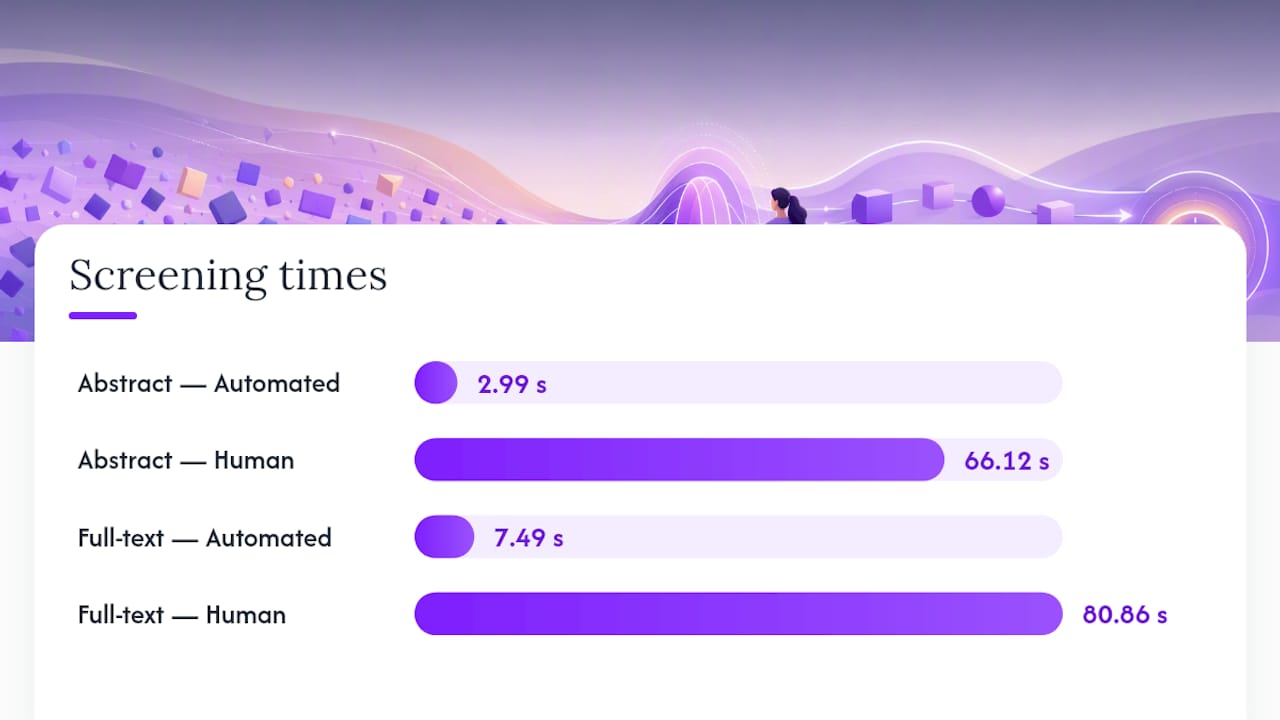
The evidence on automated screening is striking. One evaluation of an AI SLR platform reported abstract screening completed in approximately 2.99 seconds per abstract for the automated system versus 66.12 seconds for human reviewers. At full-text stage, the gap was 7.49 seconds versus 80.86 seconds. That is not a marginal efficiency gain.
Automated abstract screening at ~3 seconds per abstract versus ~66 seconds for human reviewers represents a roughly 22x throughput advantage at the screening stage.
Accuracy patterns follow a consistent split across studies. LLMs extract text and string variables with good reliability, but numeric and table variables show lower reliability and require human verification. Data extraction errors are common even in manual reviews; independent double extraction reduces errors but substantially increases workload, which is precisely the trade-off automation is designed to address.
| Metric | Automated | Human |
|---|---|---|
| Abstract screening time | ~2.99 s/abstract | ~66.12 s/abstract |
| Full-text screening time | ~7.49 s/full-text | ~80.86 s/full-text |
| Text variable extraction accuracy | High (up to ~81%) | Baseline |
| Numeric/table extraction accuracy | Lower; requires verification | Baseline |
The weakest performance consistently appears on table extraction. Teams that treat table data as automatically reliable are the ones that publish corrections.
What are the real risks, and how do you mitigate them?
Primary risk categories:
- Numeric and table extraction errors that pass undetected
- Silent regression after a model update changes extraction behavior
- Over-reliance on single-pass automated outputs without verification
- Reproducibility gaps when schema versions or model versions are not logged
Mitigation steps:
- Add lightweight automated checks after every pipeline run: confirm collectors returned results, deduplication reduced expected counts, and the LLM returned valid JSON against the schema.
- Set confidence-based flagging so low-confidence fields route automatically to human review.
- Run a triple-review sample on 5–10% of records each cycle to detect drift before it compounds.
- Log every model version, schema version, and pipeline run in your audit trail.
Living systematic reviews require active maintenance because discrepancies between automated and manual searches can arise over time. Treat your pipeline as a maintained system, not a one-time setup. For a deeper look at reproducibility practices, the reproducible literature review methodology guide covers documentation standards and traceability requirements.
For teams dealing with complex PDF tables, a practical guide to PDF table extraction covers layout-analysis approaches that preserve numeric context before it reaches the LLM.
The case for cautious, iterative adoption
Automation in systematic literature reviews is not a shortcut. It is a reallocation of effort. The hours you recover from abstract screening and data entry go back into protocol design, synthesis, and interpretation, which is where a researcher’s judgment actually changes the quality of the output.
The researchers who get the most from HITL automation are not the ones who trust it most. They are the ones who instrument it most carefully: clear schemas, logged versions, confidence thresholds set against real pilot data, and PRISMA outputs that document every decision. The audit trail is not bureaucratic overhead. It is what makes the time savings publishable.
Adopt iteratively. Pilot on a small, representative corpus. Measure correction rates before scaling. If the numbers hold, scale. If they do not, refine the schema or the thresholds before adding volume.
Papersynapse puts this workflow into practice
Cutting screening time from 66 seconds to under 3 seconds per abstract is only useful if the extraction that follows is verifiable. Papersynapse is built around exactly that constraint: every extracted field carries a source anchor, every run produces an audit trail, and PRISMA-compliant exports are built into the workflow rather than bolted on afterward.

The platform imports directly from Scopus, Web of Science, and standard RIS/CSV files, runs deduplication with DOI and fuzzy-title matching, and uses AI to populate your custom extraction schema from abstracts. Papersynapse processes up to 200 papers in under two minutes, with inline editing so your team can correct and verify without leaving the platform. Collaboration features let you assign verification roles, track adjudication decisions, and export enriched CSV or PNG visualizations for your manuscript.
Start with the free tier, run your 50-paper pilot, and measure your correction rate before upgrading. Try Papersynapse and see what your first automated run produces.
Sources
- Automating the data extraction process for systematic reviews using GPT-4o and o3 (Research Synthesis Methods)
- Living systematic review on automation for data extraction (PMC)
- BMC Medical Research Methodology review on data extraction errors (2017)
- Data extraction guideline and implementation example using open-source software (Systematic Reviews)
- Automatic systematic reviews and decision-support systems review (2014) - Springer
- freeCodeCamp tutorial on building an AI research automation pipeline