The Role of Reference Management Tools in Research
The Role of Reference Management Tools in Research
Reference management tools are specialized software that help researchers collect, organize, cite, and share bibliographic references efficiently. They sit at the center of every serious academic workflow, handling the mechanical work of citation so scholars can focus on ideas. The role of reference management tools extends well beyond simple bibliography generation. These platforms address formal rigor, reduce peer review errors, and support collaborative research at scale. Graduate students and seasoned researchers alike depend on them to maintain consistency across manuscripts, literature reviews, and grant proposals.
What are the main functions and features of reference management tools?
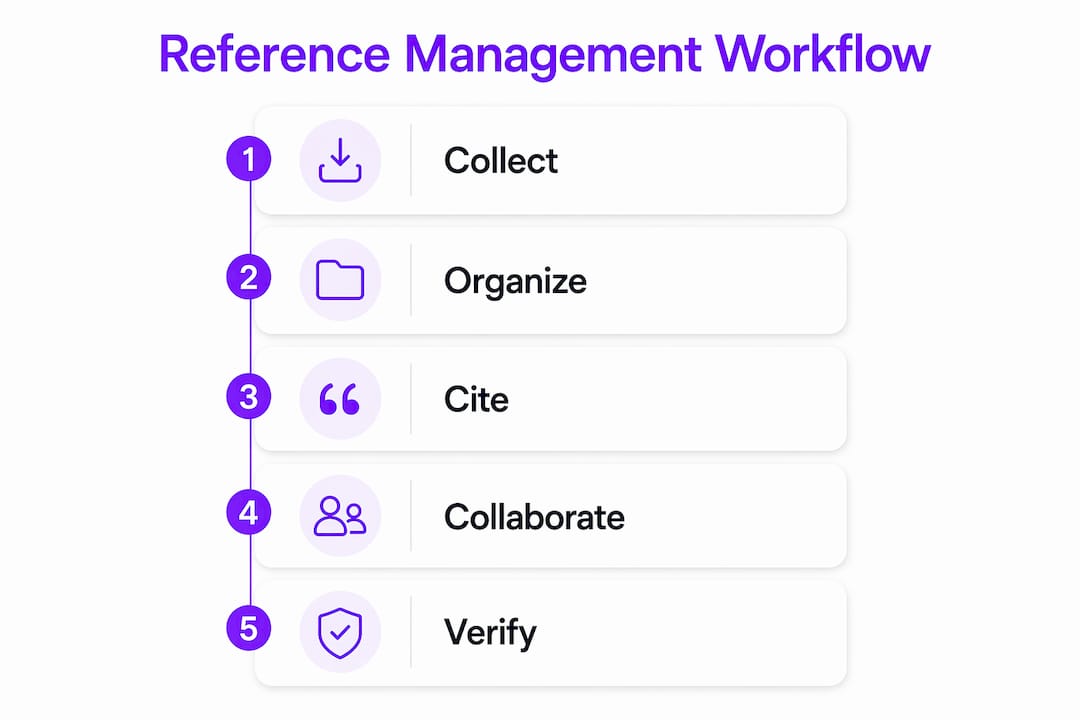
Reference management software performs four primary roles in the research lifecycle: collecting references from databases, organizing PDFs with tags and folders, inserting citations automatically into manuscripts, and facilitating collaboration among co-authors. Each function removes a distinct source of friction from academic writing. Together, they create a single, organized hub for every source a researcher touches.

The most visible feature is automated citation formatting. Tools reformat entire documents into different citation styles in seconds. That means switching a manuscript from APA 7th edition to Chicago 17th takes one click rather than hours of manual editing.
Core features found across most platforms include:
- Reference import: Direct import from databases like Scopus, Web of Science, PubMed, and Google Scholar via browser plugins or RIS/BibTeX files
- PDF management: Attach, store, and annotate full-text PDFs directly within the reference library
- Citation styles: Support for hundreds of styles including APA, MLA, Chicago, Vancouver, and IEEE
- Tagging and folders: Organize references thematically for interdisciplinary or multi-project use
- Word processor integration: Insert citations and auto-generate bibliographies inside Microsoft Word, Google Docs, and LaTeX editors
- Cloud sync: Access your library from any device, keeping references current across desktop and mobile
- Collaboration: Shared group libraries with invitation and editing privileges for co-authored projects
Pro Tip: Create a separate folder for each manuscript or project from day one. Mixing references across projects is the fastest way to lose track of sources during revision.
How do reference management tools improve research accuracy and efficiency?
The clearest benefit is time savings on repetitive formatting tasks. Adoption of reference managers lets researchers invest more effort in conceptual rigor and argumentation rather than citation mechanics. Every hour not spent reformatting a bibliography is an hour available for analysis.
Accuracy improves alongside speed. Citation errors are among the most common issues flagged during peer review, and automated formatting eliminates the majority of them. A researcher manually typing 80 references into a bibliography will introduce errors. A reference manager generating the same list from structured metadata will not, provided the metadata itself is clean.
“Reference managers increase academic productivity by allowing scholars to invest more effort in conceptual rigor rather than formatting tasks. While technologically powerful, these tools do not relieve scholars from critical responsibility in ensuring citation accuracy and intellectual integrity.”
Organization is the less-discussed but equally important benefit. Thematic tagging and folder organization are key tactics for managing large, interdisciplinary literature collections. A researcher reviewing 300 papers across three disciplines can tag each source by theme, method, and relevance, then filter instantly during writing. Without that structure, literature reviews become unwieldy and inconsistent.
Collaboration features multiply these gains for research teams. Shared libraries with invitation and editing privileges let co-authors work from the same reference pool. One author adding a new source makes it immediately available to every collaborator, eliminating the version-control problems that plague emailed reference lists.
What are the limitations and best practices when using reference management tools?
The most significant limitation is metadata quality. Metadata exported from databases often contains errors, including incorrect abbreviations, missing DOIs, and capitalization problems. A reference manager formats what it receives. If the imported data is wrong, the generated citation will be wrong too.
Automation does not transfer intellectual responsibility. Software cannot replace the human oversight required for scholarly rigor. A researcher who trusts the output without checking it is one metadata error away from a flawed bibliography in a published manuscript.
Best practices for using these tools effectively:
- Verify every imported record. Check author names, publication years, journal titles, and DOIs immediately after import. Fixing errors at entry is faster than correcting them after a bibliography is generated.
- Use a consistent tagging system. Decide on tag categories before you begin collecting references. Changing your system mid-project creates gaps and duplicates.
- Attach PDFs at the time of import. Linking the full text to each record while the source is fresh prevents orphaned references with no associated document.
- Run a final manual review before submission. Scan the generated bibliography against the citation style guide. Automated tools handle most cases correctly but miss edge cases like legal documents, datasets, and non-standard source types.
- Back up your library regularly. Export a copy of your full library in RIS or BibTeX format at regular intervals. Cloud sync is not a substitute for a local backup.
Pro Tip: After importing a batch of references from Scopus or Web of Science, sort by date added and review the last 20 records immediately. Catching errors in small batches is far less painful than auditing 500 records before a submission deadline.
How to integrate reference management tools into your literature review process
A literature review has a natural workflow, and reference management tools fit into each stage. The integration works best when researchers treat the tool as a continuous companion rather than a last-minute bibliography generator.
The workflow breaks into four connected phases:
- Collection phase: Import references directly from Scopus, Web of Science, or PubMed using browser plugins or database export functions. Apply inclusion and exclusion tags immediately so the library reflects your screening decisions from the start.
- Organization phase: Create thematic folders aligned with your review’s key topics or research questions. Add notes to individual records summarizing each paper’s argument, methodology, and relevance. This step transforms a flat list of citations into a structured knowledge base.
- Writing phase: Use the word processor plugin to insert citations as you write. Never type a citation manually. Let the tool handle formatting so your attention stays on the argument.
- Finalization phase: Generate the bibliography automatically, then run the manual verification pass described in the best practices section above.
For multi-author reviews, set up a shared group library before any team member begins collecting sources. Agree on a tagging taxonomy as a team. Inconsistent tagging across collaborators produces the same disorganization that the tool was meant to prevent.
Thematic organization pays the largest dividends in interdisciplinary projects. A systematic review spanning clinical trials, behavioral studies, and policy documents needs clear categorical separation. Tags like “RCT,” “qualitative,” and “policy brief” let any team member filter the library to their section without touching unrelated sources.
Reference management tools also complement critical reading skills rather than replacing them. The tool tracks what you have read and organizes what you found. The analysis, synthesis, and argumentation remain entirely yours. Researchers who use these tools most effectively treat them as a memory and formatting aid, not a thinking aid.
Key Takeaways
Reference management tools are most effective when researchers combine automated formatting with consistent manual verification and disciplined organizational habits.
| Point | Details |
|---|---|
| Automation saves time | Tools reformat entire documents into new citation styles in seconds, freeing time for analysis. |
| Metadata errors require manual checks | Imported records often contain missing DOIs or capitalization errors that need correction before submission. |
| Tagging drives organization | Thematic folders and tags are the most effective way to manage large, interdisciplinary reference libraries. |
| Collaboration needs shared structure | Group libraries work only when all co-authors agree on a tagging system before collecting sources. |
| Tools support, not replace, judgment | Automation handles formatting; the researcher remains responsible for citation accuracy and intellectual integrity. |
Why I think most researchers underuse these tools
Most graduate students I have observed treat reference managers as bibliography generators. They import sources, insert citations, and export a reference list. That is roughly 30% of what these tools can do. The organizational and collaborative features go almost entirely unused until a project becomes too large to manage without them, and by then the library is already a mess.
The deeper issue is that tool literacy rarely gets taught alongside research methods. A researcher can spend three years in a doctoral program without ever learning how to build a thematic tagging system or set up a shared group library. The result is that scholars who would benefit most from these productivity gains never realize them.
My honest observation is that the researchers who use these tools best are the ones who treat setup as part of the research process, not a distraction from it. Spending 20 minutes building a folder structure and tagging taxonomy before a literature review saves hours during writing and revision. The investment is front-loaded, which is why it gets skipped.
The other thing worth saying plainly: no tool removes the obligation to think carefully about your sources. Automation does not transfer intellectual responsibility. A well-organized library of poorly chosen sources is still a weak literature review. Use these tools to handle the mechanical work, then spend the time they save on the intellectual work that only you can do.
— Ubada
How Papersynapse fits into your literature review workflow
Reference management tools organize and format your sources. Papersynapse takes the next step by automating the extraction and analysis of data from those sources. Researchers who import references from Scopus or Web of Science can bring that same library into Papersynapse, where AI reads abstracts and fills structured extraction tables automatically.
The platform processes up to 200 papers in under two minutes, addressing the manual extraction bottleneck that slows most systematic reviews. Papersynapse integrates extraction, normalization, and analysis in one place, so the workflow from reference collection to synthesized findings stays connected. For researchers running large or interdisciplinary reviews, that combination of reference management and AI extraction removes the two most time-consuming stages of the process at once.
FAQ
What is the role of reference management tools in academic research?
Reference management tools collect, organize, cite, and share bibliographic references within a single platform. They automate citation formatting and bibliography generation, reducing formal errors and freeing researchers to focus on analysis.
What are the main benefits of citation tools for graduate students?
The primary benefits are time savings on formatting, reduced citation errors, and better organization of large source collections. Shared libraries also support collaborative writing across research teams.
How do I use a reference manager for a literature review?
Import references directly from databases like Scopus or Web of Science, organize them with thematic tags and folders, insert citations during writing using the word processor plugin, and run a manual verification pass before submission.
Why does metadata from databases sometimes cause citation errors?
Exported metadata often contains incorrect abbreviations, missing DOIs, or capitalization problems. Reference managers format what they receive, so errors in imported records appear directly in the generated bibliography.
Are reference management tools required for academic writing?
Reference management tools are not mandatory but are highly recommended in most academic contexts. They improve the quality and efficiency of scientific writing and are standard practice in peer-reviewed research.