Web of Science Data Import Workflow: A Researcher's Guide
Web of Science Data Import Workflow: A Researcher’s Guide

The fastest reliable approach to a Web of Science data import workflow depends entirely on scale. For a single researcher pulling a few hundred records, the web UI export to RIS or EndNote is the right call. For a reproducible batch project or systematic review, the Starter or Expanded API with programmatic tooling is the better path. For institution-level automation and recurring literature surveillance, a scalable pipeline like Papersynapse handles ingestion, normalization, and extraction without manual intervention.
- Manual export (UI): Delivers RIS, EndNote, Tab/Excel, BibTeX, or savedrecs.txt; limited to 500–1,000 records per chunk; best for ad hoc pulls and individual researchers.
- Programmatic/API: Starter API covers search-level metadata; Expanded API adds full affiliations and cited references; requires institutional subscription and quota management; ideal for reproducible batch analysis.
- Scalable automation: Tools like Papersynapse accept CSV/RIS imports, apply AI-assisted normalization and extraction, and support team collaboration across repeated systematic literature reviews.
Pro Tip: Record your database/index selection, the exact Advanced Search string, and the export fields you chose at the moment of export. Index coverage varies by institution and changes over time, so this metadata is the only thing that makes your results reproducible later.
Table of Contents
- What does the Web of Science data import workflow look like step by step?
- Which export format should you choose?
- Which workflow fits your research scale?
- How do you import exported files into EndNote, Zotero, InCites, Faculty Success, and Papersynapse?
- What are the most common import problems and how do you fix them?
- Key Takeaways
- Why reproducible export workflows matter more than most researchers realize
- Papersynapse handles the parts of this workflow that slow teams down
- Useful sources and further reading
What does the Web of Science data import workflow look like step by step?
The web UI export is the starting point for most researchers. Here is the exact sequence.
-
Sign in and select your database. Go to Web of Science and log in with your institutional credentials. Choose your database carefully: Web of Science Core Collection is the standard for most citation analysis, but your institution may also license MEDLINE, BIOSIS, or other indexes. The database you select directly affects coverage, so note it.
-
Build a reproducible query using Advanced Search. Advanced Search is the only interface that supports proximity operators (NEAR/x), nested Boolean logic, and full field-tag access. Write your query there, save the string, and copy it into a plain-text manifest file. Keep in mind that All Fields searches are capped at 49 Boolean/proximity operators, so complex queries may need restructuring.
-
Add results to the Marked List. Run your search, then select records. Use “Select All” for up to 500 records at a time, or manually mark specific records. Click “Add to Marked List.”
-
Open the Export menu. From the Marked List, click “Export.” You will see format options: EndNote Desktop, RIS (plain text/savedrecs.txt), Tab-delimited (Win or Mac), BibTeX, and CSV/Excel.
-
Choose Full Record + Cited References. This field selection is non-negotiable for citation analysis. It pulls DOI, Accession Number, Times Cited, author affiliations, and the full cited reference list. Skipping Cited References means you cannot trace citation networks later.
-
Chunk large exports. Web of Science limits exports by format: typically 500 records per export for some formats, up to 1,000 for others. For larger result sets, use the Fast 5K option when available, or export in sequential chunks (records 1–500, 501–1,000, and so on), naming each file clearly.
-
Verify the savedrecs.txt file. Open the file in a plain-text editor. Confirm it starts with FN (File Name) and ER tags on each record, and ends with EF on its own line. Missing the EF tag causes import failures in downstream tools.
Pro Tip: When exporting for Linux or Unix-based downstream processing, choose “Tab Delimited (Mac)” rather than the Windows variant. Mac line endings are Unix-compatible; Windows line endings (\r ) can break parsers that expect only.
Which export format should you choose?
The right format depends on where the data is going. Web of Science supports RIS/plain text (savedrecs.txt), direct EndNote export, Tab-delimited/Excel, BibTeX, and CSV. Here is how to match format to destination.
| Export Format | Best For | Key Fields Preserved | Notes |
|---|---|---|---|
| RIS (savedrecs.txt) | Zotero, reference managers, NACSOS | TI, AU, DO, UT, CR | Wide compatibility; check EF tag |
| EndNote Direct Export | EndNote Desktop library | All WoS fields | Fastest path to EndNote |
| Tab-delimited / CSV | Excel, R, Python analysis | Configurable | Use Mac variant for Unix tools |
| BibTeX | LaTeX, Pandoc, Overleaf | TI, AU, JO, DO | Limited citation-count fields |
| CSL-JSON (converted) | Modern toolchains, AI pipelines | Full metadata | Convert from savedrecs.txt via twineconvert |
The field mapping matters as much as the format itself. When you export to RIS, the DOI lands in the DO tag, the Accession Number in UT, and Times Cited in Z9. Zotero reads DO natively; EndNote maps UT to its Accession Number field. For CSV analysis in R or Python, you configure the field selection at export time, so always include DOI, UT, TC (Times Cited), and C1 (Affiliations) explicitly.
CSL-JSON is worth a separate note. It is becoming the preferred interchange format for modern automated research toolchains. Converting a WOS plain-text export to CSL-JSON using a browser-based tool like twineconvert runs entirely client-side, so your files never leave your device.
Pro Tip: Field truncation is a real problem in Tab-delimited exports: the Cited References field (CR) can be cut off for records with long reference lists. If citation tracing is part of your analysis, verify a few records against the Web of Science UI to confirm the CR field is complete.
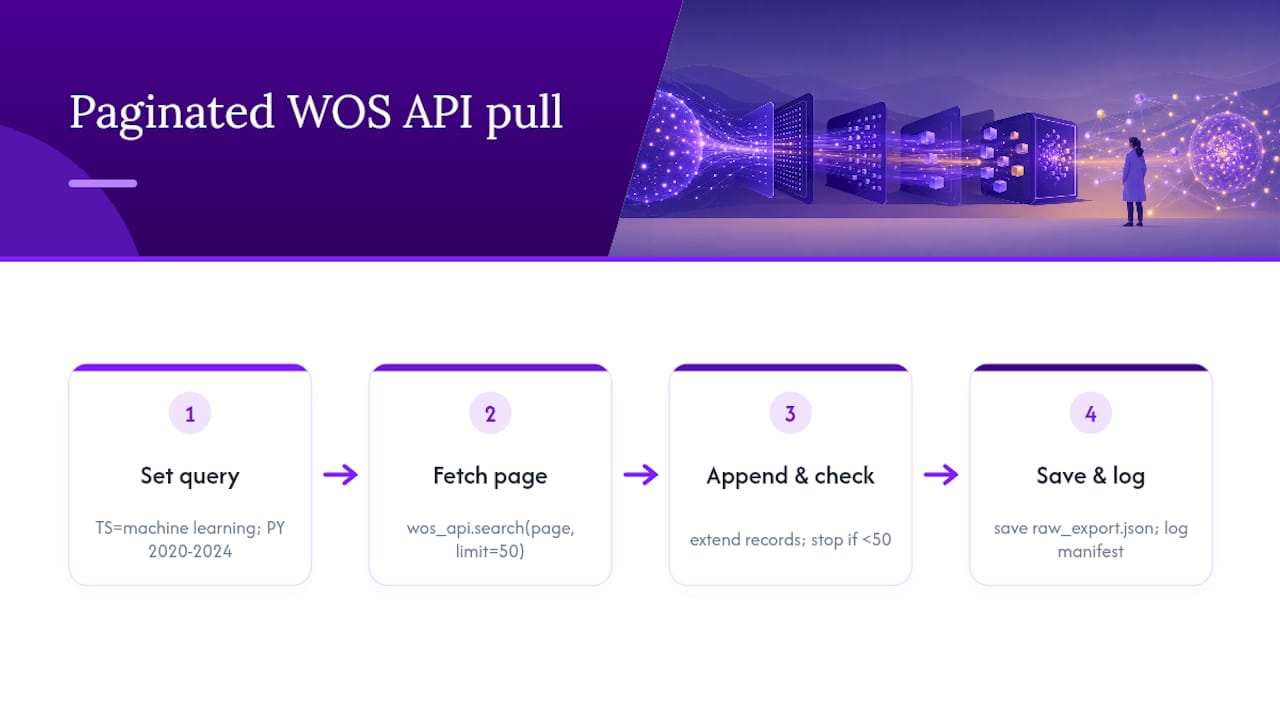
Pseudocode: paginated Web of Science API pull
query = “TS=(machine learning) AND PY=2020-2024” page = 1 batch_size = 50 all_records = []
while True: response = wos_api.search(query=query, page=page, limit=batch_size) all_records.extend(response[“records”]) if len(response[“records”]) < batch_size: break # last page reached page += 1
save_json(all_records, “raw_export.json”) log_manifest(query=query, index=“WOS”, date=today(), record_count=len(all_records))
For batch processing on compute clusters, the [UW-Madison Libraries tutorial](https://www.library.wisc.edu/data-services/clarivate-web-of-science-data-set/web-of-science-chtc-tutorial/step-by-step-tutorial/) walks through cloning the wos-explorer repository, building the package with Python 3, moving savedrecs.txt into the working directory, and running batch jobs. It also covers using `scp` to transfer outputs from cluster staging environments.
| API Tier | Metadata Depth | Quota Impact | Typical Use Case |
|---|---|---|---|
| Starter API | Title, author, source, basic fields | Low | Initial screening, profile updates |
| Expanded API | Full record + affiliations + cited refs | Counts against yearly quota | SLRs, citation analysis, institutional reporting |
**Pro Tip:** *Automate a metadata manifest at every API run. Log the query string, index selected, API tier used, run timestamp, and total records retrieved. Store this file alongside your raw exports in version control. Without it, reproducing the exact dataset six months later is nearly impossible.*
## Which workflow fits your research scale?
### Single researcher
Use the Web of Science UI export. Build your query in Advanced Search, save the string, export Full Record + Cited References as RIS or EndNote format, and import directly into EndNote or Zotero. For a [literature review workflow](https://blog.papersynapse.com/blog/literature-review-workflow-checklist), convert savedrecs.txt to CSL-JSON via twineconvert if your downstream tools prefer JSON.
Required: institutional Web of Science login. Validate by opening the exported file in a text editor and confirming record count matches the UI result count.
### Batch or reproducible project
Prefer the API or wos-explorer over manual chunked exports. Store raw export files in a project folder, version-control your query manifest, and convert to CSL-JSON for analysis pipelines. For [systematic review protocols](https://blog.papersynapse.com/blog/types-of-systematic-review-protocols) that require PRISMA documentation, log the index, date, and record count in your PRISMA flow diagram at this stage.
Required: institutional API access (Starter minimum), Python 3, and a version-control system (Git).
### Institutional sync
Provision Expanded API access through your library. Schedule automated exports on a defined cadence (weekly or monthly), log quota consumption per run, and centralize raw exports in a shared repository with role-based access controls. Assign one team member to monitor quota limits and flag when the yearly threshold approaches.
Required: Expanded API subscription, shared storage with access controls, and a designated data steward.
## How do you import exported files into EndNote, Zotero, InCites, Faculty Success, and Papersynapse?
Each tool has a preferred import path. Getting this right the first time saves a round of deduplication.
- **EndNote:** Use the direct "EndNote Desktop" export option from Web of Science. In EndNote, go to File > Import > File, select the exported file, and choose "Web of Science Core Collection" as the import filter. Confirm the library you are importing into before clicking Import. This is the fastest path and preserves the most fields natively.
- **Zotero:** BibTeX works, but CSL-JSON gives better field parity and cleaner tag handling. Export savedrecs.txt from Web of Science, convert to CSL-JSON using twineconvert, then drag the JSON file into Zotero or use File > Import. Zotero will map DOI, title, authors, and source correctly. Alternatively, Researcher Profiles in Web of Science accept RIS, CSV, or BibTeX uploads and attempt automatic metadata enrichment, sending email notifications if processing errors occur.
- **InCites:** InCites expects Web of Science Accession Numbers (UT field) to match records in its database. Export your result set as Tab-delimited with the UT field included, then upload through the InCites dataset import interface. Institutional subscription is required; contact your library administrator if the import option is not visible.
- **Faculty Success (Watermark):** The [integration setup](https://support.watermarkinsights.com/hc/en-us/articles/19990950071195-Web-of-Science-Integration-Setup) follows a standard flow: search Web of Science within the Faculty Success interface, select records, handle duplicates using the built-in matching tool, assign collaborators, review, and confirm import. For bulk loads outside the native integration, export CSV from Web of Science and use Faculty Success's manual import with field mapping. Duplicate handling is the most common friction point here.
- **Papersynapse:** Import your exported CSV or RIS file directly into Papersynapse. The platform maps Web of Science fields automatically, applies AI-assisted normalization to author names and affiliations, and extracts structured data from abstracts into configurable tables. For teams running repeated systematic literature reviews, this eliminates the manual extraction step that typically consumes the most time in a research cataloging workflow.
**Pro Tip:** *Before importing your full dataset, test with a 10–20 record sample. Verify that DOI, title, author, and source fields map correctly in the target tool. Catching a field-mapping error on 20 records is trivial; catching it after 2,000 records are already in your library is not.*
## What are the most common import problems and how do you fix them?
Most Web of Science import failures trace back to a handful of predictable issues.
- **Duplicates:** Web of Science returns cited references exactly as printed in source bibliographies. The same paper may appear as multiple variants with slightly different author spellings or journal abbreviations. In Cited Reference Search, always select multiple variants of the same work to avoid undercounting. In EndNote and Zotero, run the built-in duplicate finder after import before doing any further work.
- **Missing DOIs:** Some older records and conference papers lack DOIs in the Web of Science export. For records missing a DOI, search by Accession Number (UT field) or PubMed ID to retrieve additional metadata. In Zotero, the "Find Available PDFs" function can sometimes fill gaps.
- **Truncated fields:** The CR (Cited References) field truncates in some export formats when reference lists are long. If citation tracing is central to your analysis, verify a sample of high-citation records against the Web of Science UI. For the Expanded API, request the `citedReferences` field explicitly in your API call.
- **EF tag and encoding issues:** If savedrecs.txt fails to import into NACSOS, wos-explorer, or another tool, open the file in a plain-text editor and check that the last line reads `EF` with no trailing spaces. If it is missing, add it manually. For [Unix-based downstream processing](https://nacsos.pik-potsdam.de/documentation/user/import/wos/), confirm line endings are
(Unix/Mac), not \r
(Windows). The "Tab Delimited (Mac)" export option from Web of Science produces Unix-compatible line endings.
- **Rate limits:** Manual chunked exports for large datasets are slow and error-prone. If you are exporting more than 2,000 records, switch to the API with batch pagination. Rate limits vary by subscription tier; build a short sleep interval (1–2 seconds) between API calls to avoid throttling.
**Pro Tip:** *Document the index collections you searched (e.g., Science Citation Index Expanded, Social Sciences Citation Index) in your methods section. Index coverage varies by institution and changes over time, so a search run today may return different results than the same query run two years ago on a different institutional account.*
## Key Takeaways
A reproducible Web of Science data import workflow requires matching your approach to your scale, documenting every export decision, and validating imports before full ingestion.
| Point | Details |
|---|---|
| Match approach to scale | Use UI export for individual pulls, API for batch projects, and automated pipelines for institutional sync. |
| Document every export | Record the database/index, Advanced Search string, export fields, and date in a manifest file at export time. |
| Validate before full import | Test a 10–20 record sample in your target tool to catch field-mapping errors before importing thousands of records. |
| Fix EF tag and encoding first | Check savedrecs.txt for the EF end-of-file tag and Unix line endings before running any downstream import tool. |
| Papersynapse for scale | Papersynapse accepts CSV/RIS imports, automates field normalization and AI extraction, and supports PRISMA-compliant SLR workflows for teams. |
## Why reproducible export workflows matter more than most researchers realize
The conventional wisdom treats the export step as a formality: run the search, download the file, move on. That framing is wrong, and the consequences show up at the worst possible moments.
Systematic reviews submitted to journals increasingly require a PRISMA flow diagram that names the databases searched, the date of the search, and the record counts at each stage. If you did not record which Web of Science indexes your institution had licensed at the time of your search, you cannot accurately complete that diagram. A reviewer who tries to replicate your search six months later on a different institutional account may get a different result set, not because your search was wrong, but because index coverage shifted. That is not a hypothetical: institutional Web of Science subscriptions change, and the Core Collection is not a fixed entity.
The programmatic case is even clearer. A manually chunked export of 3,000 records across six sessions, done over two days, is almost impossible to reproduce exactly. An API query with a stored manifest file and version-controlled raw outputs can be re-run by anyone with the same credentials and produce an identical dataset. For longitudinal tracking, where you need to compare this year's literature pull against last year's, that reproducibility is the entire point.
Version control for queries is not a nice-to-have for serious research teams. It is the difference between a defensible methods section and one that cannot survive peer review. A [shared research database](https://blog.papersynapse.com/blog/shared-research-database-explained) with access controls and centralized raw exports gives institutional teams the audit trail that individual researchers rarely maintain on their own.
## Papersynapse handles the parts of this workflow that slow teams down
Manual export and import gets the data into your tools. What it does not do is extract structured information from 500 abstracts, normalize author affiliations across three export batches, or flag which papers meet your inclusion criteria. That is where most systematic review teams lose days.
Papersynapse accepts CSV and RIS imports directly from Web of Science exports. Once your records are in, the platform's AI reads abstracts and fills configurable extraction tables, applies label normalization across the full dataset, and supports PRISMA-compliant screening workflows. For multi-author teams running recurring literature surveillance, Papersynapse processes up to 200 papers in under two minutes, which means a weekly literature update that used to take a full afternoon becomes a scheduled task. The platform also exports enriched CSV and PNG visualizations, so the output is ready for reporting without a separate cleaning step.
If you are running a systematic review, managing faculty publication reporting, or building a recurring literature monitoring workflow, [start a free trial at Papersynapse](https://papersynapse.com) to see how automated ingestion and AI extraction fit your current process.
## Useful sources and further reading
The links below are the primary references for implementing the workflows described in this article.
- Export records — Web of Science
- [Adding and removing publications from Web of Science Researcher Profiles](https://webofscience.zendesk.com/hc/en-us/articles/25740789794193-Adding-and-removing-publications-from-Web-of-Science-Researcher-Profiles)
- How to Search Web of Science Effectively — CASRAI
- Importing Web of Science — NACSOS Documentation
- WOS to CSL-JSON — twineconvert
- Step-by-Step Tutorial | UW–Madison Libraries
- Search Rules — Web of Science
- Web of Science Integration Setup — Watermark Support
For API access, contact your institution's library research services office. Most U.S. research universities can provision Starter API credentials within a few business days; Expanded API access typically requires a separate request tied to your institutional subscription agreement.
## Recommended
- [PaperSynapse: AI Tool for Systematic Literature Reviews](https://papersynapse.com)
- [Research Database Management: A Guide for Academics | PaperSynapse](https://blog.papersynapse.com/blog/research-database-management-a-guide-for-academics)
- [Reduce Manual Coding Research Data: SLR Guide](https://blog.papersynapse.com/blog/reduce-manual-coding-research-data)
- [Literature Review Workflow Checklist for Researchers | PaperSynapse](https://blog.papersynapse.com/blog/literature-review-workflow-checklist)