For systematic literature reviews
The extraction layer for researchers who already have their paper list.
Import your Scopus, Web of Science, or Zotero export, or upload the PDFs. Define the fields your review needs, and PaperSynapse reads every paper to build a structured table you can screen, chart, and query across hundreds of studies.
01The problem
The research gap
Systematic literature reviews are the backbone of academic research, yet the most critical step, extracting and synthesizing data from hundreds of papers, remains painfully manual.
Hours of manual work
Researchers spend 40+ hours manually reading and categorizing papers for a single systematic review.
Inconsistent results
Human extraction is subjective and error-prone, leading to missed patterns and inconsistent categorization.
Limited scale
Manual approaches don't scale beyond a few hundred papers, forcing researchers to narrow their review scope.
02Comparison
One platform for the whole workflow
Most tools cover one part of the process. PaperSynapse covers import, extraction, screening, normalisation, visualisation, and analysis in a single place.
Table 1. Coverage of the literature review workflow by tool category.
| Capability | PaperSynapse | AI paper finderdiscover and extract | AI PDF readerchat with papers | AI research searchconsensus answers |
|---|---|---|---|---|
| Import your own paper list (CSV / RIS) | ||||
| Abstract-based (no PDF required) | ||||
| Configurable extraction fields for your domain | ||||
| Label normalisation across the dataset | ||||
| PRISMA screening workflow | ||||
| Custom charts per extracted field | ||||
| Custom tables per research question | ||||
| AI chat | ||||
| Export structured CSV of extracted data | ||||
| Full workflow in one platform |
03Capabilities
Everything you need for literature analysis
From import to insight, PaperSynapse handles the entire pipeline so you can focus on what matters: your research.
Label normalisation
AI suggests merging equivalent labels across your dataset, e.g. "CNN" and "Convolutional Neural Network". Accept in bulk or pick manually. Charts and counts stay consistent automatically.
PRISMA screening
Mark each paper Include, Maybe, or Exclude with an optional reason. Filter your table and charts to included papers only. Supports structured screening workflows for systematic reviews.
Custom tables per research question
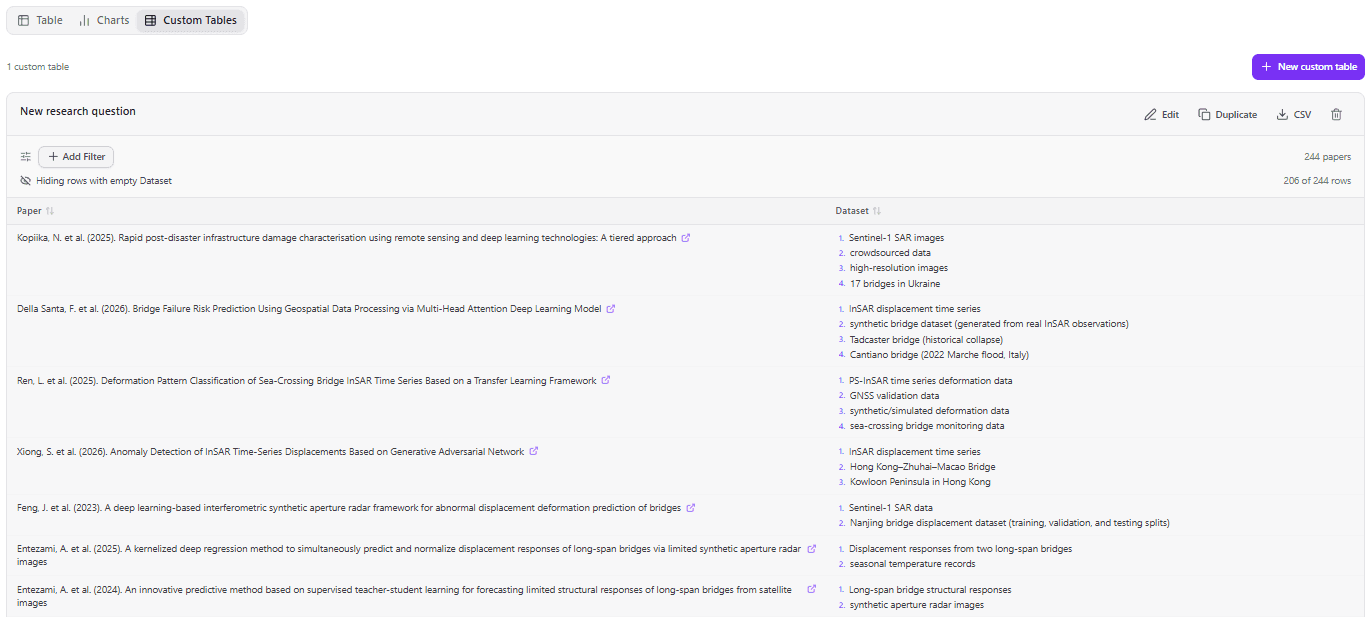
Build focused tables for each research question. For example, a "What datasets have been used" table with the paper citation, Dataset, and any other columns you want. Per-table filters, hide-empty-rows toggle, and CSV export.
Custom chart builder
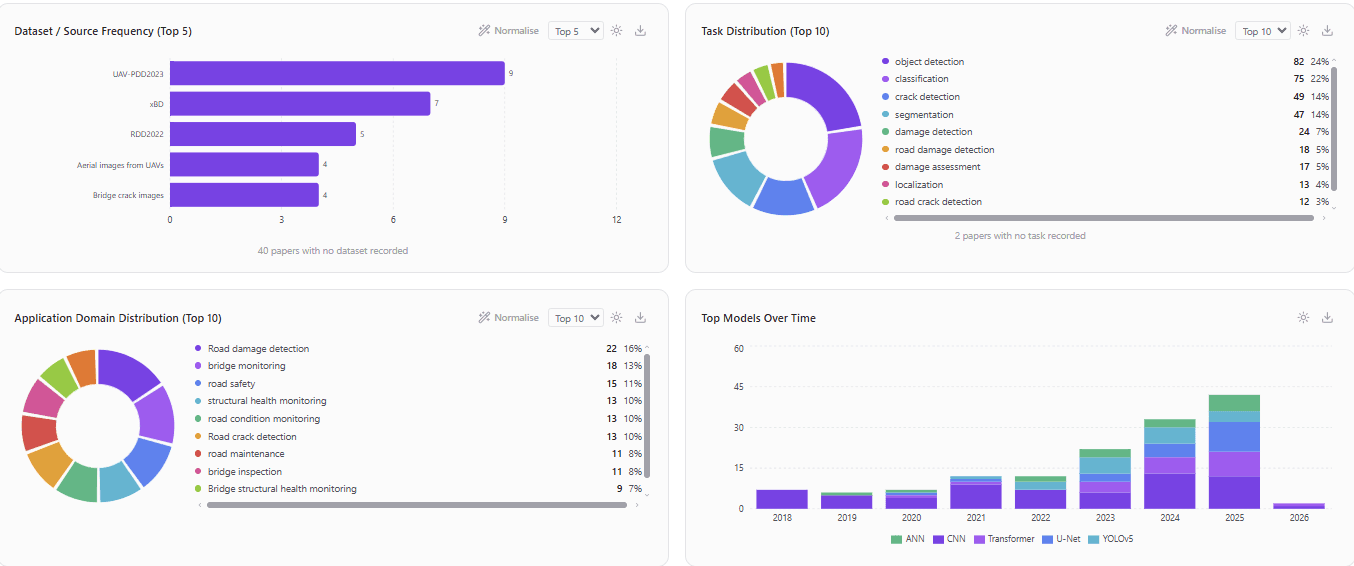
Built-in charts for every extracted field, plus a custom chart builder. Pick any field, choose vertical bar, horizontal bar, or pie/donut, set how many items to show, and export any chart as PNG.
Configurable extraction fields
Define exactly what to extract for your domain. Add custom fields with plain-language descriptions that guide the AI. Works for any field: CS, medicine, social science, economics, and more.
AI-powered extraction
AI reads each abstract, or the full paper when you upload PDFs, and fills your configured fields. Runs in parallel batches, so 200 abstracts are extracted in under two minutes.
Smart import
Import CSV or RIS files from Scopus, Web of Science, Zotero, PubMed, IEEE Xplore, and more, or drop in PDFs. Automatic column detection handles any format, and you can keep adding papers later.
Smart filtering
Filter by any field using AND/OR logic. Use contains, excludes, and year-range operators. Filters apply across the table, charts, and custom tables simultaneously.
AI chat assistant
Ask natural language questions about your literature. The assistant uses tool calling to query your filtered dataset and give count-accurate answers, even across hundreds of papers.
Inline editing
Click any cell to correct or refine AI-generated data. Edits propagate to all views instantly, including custom tables and charts.
Export and save
Projects save automatically. Export enriched CSV files with all extracted data and screening decisions, and reopen previous analyses anytime.
Try it on your own papers
Get started free04Workflow
How it works
Three steps from a reference export to a dataset you can analyse.
Upload
Import a reference file (CSV or RIS) from Scopus, Web of Science, Zotero, and other reference managers, or upload the PDFs themselves.
Extract
Configure your fields and let AI read each abstract or full paper, with structured results streaming into the table as they arrive.
Analyse
Explore results with sortable tables, 6 chart types, AND/OR filters, year-range filtering, label normalisation, and an AI chat assistant that answers questions about your data.
05Demo
See it in action
Watch how PaperSynapse turns a Scopus export into structured, filterable insights in under three minutes.
Demo video coming soon
06Questions
Frequently asked questions
Everything you need to know before getting started.
Does PaperSynapse need PDF files?
No. PaperSynapse works from your exported reference list (a CSV or RIS file from Scopus, Web of Science, Zotero, PubMed, or any major reference manager) and extracts from each abstract. On Pro and Ultra you can also upload PDFs, up to 30 at a time, to extract from the full paper. Each PDF counts as 5 papers towards your monthly allowance.
How does the AI extraction work?
You configure the fields you want to extract (e.g. Dataset, Model, Accuracy, Task) with plain-language descriptions. PaperSynapse then uses AI to read each abstract, or each full paper for uploaded PDFs, and fill those fields with what the authors actually used. You can add any custom field for any research domain. Results stream in real time.
What is label normalisation?
When you have hundreds of papers, the same concept often appears under different names ("CNN", "Convolutional Neural Network", "ConvNet"). Label normalisation lets AI suggest which labels to merge so your charts and counts stay accurate. You review and confirm every merge.
Does it support PRISMA screening?
Yes. You can mark each paper Include, Maybe, or Exclude with an optional reason. Filter your table and charts to included papers only. This supports the screening and eligibility stages of a PRISMA-compliant systematic review.
How is this different from AI discovery or PDF chat tools?
AI discovery tools help you find papers. AI PDF chat tools help you read individual papers. PaperSynapse is built for the step after: structured extraction, screening, and analysis across your entire paper list at once, with configurable fields, label normalisation, PRISMA screening, and custom charts and tables.
How many papers can I process?
The free plan includes 50 paper extractions per month. Pro (£10/month) includes 250 and Ultra (£25/month) includes 1,000. Processing 200 papers typically takes under two minutes.
Can I export my results?
Yes. Export a CSV with all original metadata plus every extracted field and screening decision. Individual custom tables export as separate CSVs. Charts export as PNG images.
08Contact
Get in touch
Have a question or need support? We’d love to hear from you.
Response time
We typically respond within 24 hours on business days. Pro and Ultra subscribers receive priority support.
Quick answers
What file formats are supported?
CSV and RIS files from Scopus, Web of Science, Zotero, PubMed, IEEE Xplore, Mendeley, and more, plus PDFs on Pro and Ultra.
Is my data secure?
Yes. Your data is encrypted in transit and at rest. We never share your research data with third parties.
Can I cancel anytime?
Yes. Cancel your subscription at any time from your billing dashboard. No lock-in contracts.